Page 1 of 1
QCad display some objects with wrong sizes
Posted: Wed Jun 17, 2020 4:39 pm
by sistemas.caw
Hello,
We have some DWG files that when openned with QCad display some objects with wrong sizes. (See attached file). Is it a bug?
Re: QCad display some objects with wrong sizes
Posted: Wed Jun 17, 2020 6:18 pm
by Husky
Hi,
the Dimension "Size scale factor" is set for some reasons to 10. Change it to 1 and it should do the trick ...
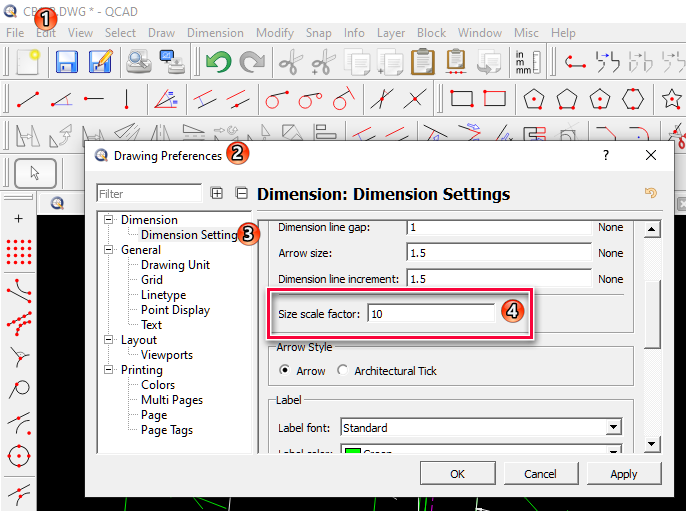
- Husky-2020.06.17-01.png (80.36 KiB) Viewed 8392 times
Bug? I don't know ....
If the dwg drawing has the setting 10 - then I wouldn't consider that as a bug.
If the dwg drawing has the setting 1 - then I would consider that as a bug.

Re: QCad display some objects with wrong sizes
Posted: Wed Jun 17, 2020 8:00 pm
by CVH
Hi,
Remark other subtle differences Qcad vc AC!
- Fontfaces
- Arrow style
- Except 2, the Dims are on Layer 0 ; Layer 0 color = white ; AC view = green
(Andrew recently added dimension text color)
- Even with 'Size scale factor' = 1 the placement of the Dim text differs
- looking at QCAD.PNG: How does Qcad come up with view cut A to A?
Strange use of Dim Label = '<>.4' and '<>.5' why not shift the entities and the dim?
The file has unit 'none'!
Regards,
CVH
Re: QCad display some objects with wrong sizes
Posted: Mon Jul 06, 2020 8:08 pm
by sistemas.caw
Husky wrote: ↑Wed Jun 17, 2020 6:18 pm
Hi,
the Dimension "Size scale factor" is set for some reasons to 10. Change it to 1 and it should do the trick ...
Husky-2020.06.17-01.png
Bug? I don't know ....
If the dwg drawing has the setting 10 - then I wouldn't consider that as a bug.
If the dwg drawing has the setting 1 - then I would consider that as a bug.
Hello,
Thanks for reply,
The scale factor property is really 10.
I did some tests with this property in Autocad and I see that it only affects the lines of dimensions, don't change text size.
As DWG file went created by Autodesk, shouldn't QCad behave in the same way as Autocad?
Regards,
Rhodolfo.
Re: QCad display some objects with wrong sizes
Posted: Mon Jul 06, 2020 8:21 pm
by sistemas.caw
Hello,
Thanks for reply,
Good comparison.
CVH wrote: ↑Wed Jun 17, 2020 8:00 pm
Remark other subtle differences Qcad vc AC!
- Fontfaces
- Arrow style
- Except 2, the Dims are on Layer 0 ; Layer 0 color = white ; AC view = green
(Andrew recently added dimension text color)
About text color of dimension, I didn't have seen.
CVH wrote: ↑Wed Jun 17, 2020 8:00 pm
- Even with 'Size scale factor' = 1 the placement of the Dim text differs
- looking at QCAD.PNG: How does Qcad come up with view cut A to A?
About The Cut A to A, I didn't have seen too. (this is more critical!).
CVH wrote: ↑Wed Jun 17, 2020 8:00 pm
Strange use of Dim Label = '<>.4' and '<>.5' why not shift the entities and the dim?
The file has unit 'none'!
We receive theses dwg from our custommers, then we don't have much control about how it is made.
Regards,
Rhodolfo.
Re: QCad display some objects with wrong sizes
Posted: Fri Jul 10, 2020 3:33 pm
by sistemas.caw
Hello,
Is there a possibility that QCad has the same behavior as Autocad in relation to the "Size scale factor" parameter?
Last year we bought QCad Profesional. If this issue is not solved, we'll need to leave QCad.

Att,
Rhodolfo.
Re: QCad display some objects with wrong sizes
Posted: Fri Jul 10, 2020 4:34 pm
by andrew
The problem is complex:
- the dimensions in drawing "CB1-B.dwg" use text style "1"
- text style "1" has a fixed text height of 40 (usually that would be 0 to allow dynamic text heights)
- the overall scale factor of the dimension style for this drawing is 10
QCAD correctly applies the overall scale factor of 10 to all dimensions. However, it also applies the scale to the text labels which Autocad doesn't because the dimension text style has a fixed height instead of 0.
As you might have noticed, QCAD does not support dimension styles or text styles for simplicity, so this behaviour cannot be easily replicated in QCAD. If dimension sizes are scaled, all dimension sizes are scaled, including the text height in QCAD.
The easiest fix in QCAD is to set the text height from "30" to "3" under Edit > Drawing Preferences > Dimension > Dimension Settings.
If you need to have the exact behaviour of Autocad, you would indeed have to stick to a solution that supports dimension styles and text styles like Autocad.