

Stretch
Dette indhold er ikke tilgængeligt i dit sprog endnu.
Toolbar / Icon:


Menu:
Modify > Stretch
Shortcut:
S, S
Commands:
stretch | ss
Description
Section titled “Description”This tool stretches contours and dimension entities. This can also be described as moving all endpoints within a given rectangular or polygonal area.
If there is a selection of entities, this tool only affects the selected entities. Otherwise, this tool operates on all entities in the given area.
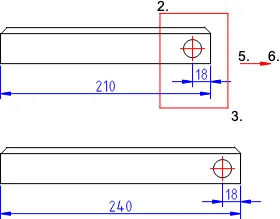
- Choose in the options toolbar if you want to stretch a rectangular area (rectangle symbol) or a polygonal area (polygon symbol).
- Set the first corner of the stretch area.
- Set the second corner of the stretch area.
- For polygonal areas, set the other corners of the stretch area and right-click the last corner when finished.
- Set the reference point for moving using the mouse or enter a coordinate in the command line.
- Set the target point.