การรันสคริปต์จากไฟล์
การพิมพ์สคริปต์ลงใน Script Shell ของ QCAD อาจกลายเป็นเรื่องน่าเบื่ออย่างรวดเร็ว ทันทีที่สคริปต์เริ่มซับซ้อนขึ้นเล็กน้อย คุณอาจต้องการเขียนลงในไฟล์แทน สำหรับสคริปต์เชิงกระบวนการที่ไม่ต้องมีการโต้ตอบ คุณสามารถสร้างไฟล์ข้อความที่มีการเรียกใช้ QCAD API และรันสคริปต์โดยใช้ อื่นๆ > การพัฒนา > เรียกใช้สคริปต์
ตัวอย่าง
Section titled “ตัวอย่าง”การพล็อตฟังก์ชัน
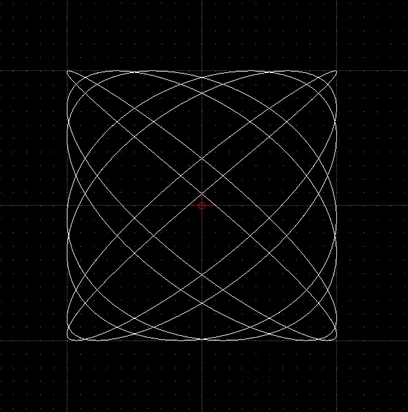
Section titled “การพล็อตฟังก์ชัน”งานทั่วไปสำหรับสคริปต์คือการพล็อตฟังก์ชันทางคณิตศาสตร์ ตัวอย่างนี้พล็อตเส้นโค้งลิสซาจูส (Lissajous)
โปรดสังเกตว่าบรรทัดที่ขึ้นต้นด้วย // เป็นความคิดเห็น ความคิดเห็นจะถูกละเว้นและมีไว้เพื่ออธิบายเท่านั้น
// constants:a = 7; b = 6;// phase angle:phi = 0.2 * Math.PI;// iteration step:step = Math.PI / 256;// width of plot (amplitude in X):w = 100;// height of plot (amplitude in Y):h = 100;
// array of x,y coordinates on the curve:v = [];
// loop:for (t = 0.0; t < Math.PI * 2; t += step) {    // compute next x,y coordinate:    x = w * Math.sin(a * t + phi);    y = h * Math.sin(b * t);
    // append coordinate to our array of coordinates:    v.push([x,y]);}
// add a spline to the drawing, using// the computed coordinates as fit points:addSpline(v, true);
// auto zoom:autoZoom();