

Layers, Blocks and Attributes
Introduction
Section titled “Introduction”In CAD, the attributes of an entity (color, linetype, lineweight) are usually controlled through layers. Entities placed on a colored layer inherit that layer’s color. The same principle applies to entities inside a block.
The special attribute value By Block lets an entity take on the attributes of the layer on which its containing block is inserted, rather than the attributes of its own layer.
Example
Section titled “Example”The following example shows a single block reference inserted on layer “2”:
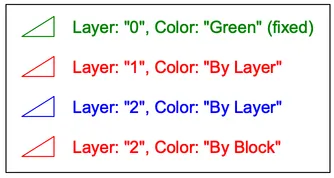
The block contains four triangles with text, each set up differently:
- The top triangle and text are on layer “0” with the color fixed to Green. They stay green regardless of where the block is inserted.
- The second triangle and text are on layer “1” with the color set to By Layer. They are shown in red, the color of layer “1”.
- The third triangle and text are on layer “2” (blue) with the color set to By Layer. They inherit the blue color of layer “2”.
- The bottom triangle and text are on layer “2” with the color set to By Block. Instead of the color of their own layer, they inherit the color of the layer on which the block reference is inserted.
When the same block reference is instead inserted on an orange layer, only the By Block entities change. They now appear orange, following the block reference’s insertion layer:
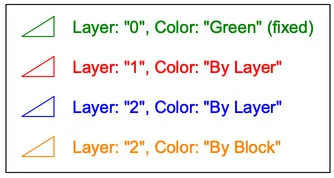
The property values By Layer and By Block are not only available for colors, but also for the other entity attributes lineweight and linetype.