从文件运行脚本
在 QCAD 的脚本终端中输入脚本很快就会变得繁琐。一旦脚本变得稍微复杂一些,你可能会想改为将它们写入文件。对于不需要交互的过程式脚本,你可以简单地创建一个包含 QCAD API 调用的文本文件,然后使用 其他 > 开发 > 运行脚本 来运行该脚本。
绘制函数图形
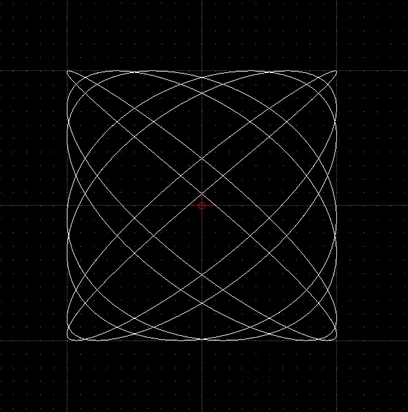
Section titled “绘制函数图形”脚本的一个典型任务是绘制数学函数图形。此示例绘制一条李萨如曲线。
请注意,以 // 开头的行是注释。注释会被忽略,纯粹用于说明。
// constants:a = 7; b = 6;// phase angle:phi = 0.2 * Math.PI;// iteration step:step = Math.PI / 256;// width of plot (amplitude in X):w = 100;// height of plot (amplitude in Y):h = 100;
// array of x,y coordinates on the curve:v = [];
// loop:for (t = 0.0; t < Math.PI * 2; t += step) {    // compute next x,y coordinate:    x = w * Math.sin(a * t + phi);    y = h * Math.sin(b * t);
    // append coordinate to our array of coordinates:    v.push([x,y]);}
// add a spline to the drawing, using// the computed coordinates as fit points:addSpline(v, true);
// auto zoom:autoZoom();