ファイルからスクリプトを実行する
QCADのスクリプトシェルにスクリプトを入力するのは、すぐに面倒になることがあります。スクリプトが少しでも複雑になってきたら、代わりにファイルに記述したくなるでしょう。対話を必要としない手続き型スクリプトの場合は、QCAD APIの呼び出しを記述したテキストファイルを作成し、その他 > 開発 > スクリプトを実行 を使ってスクリプトを実行するだけです。
関数のプロット
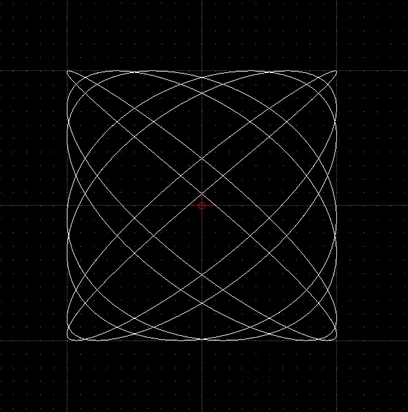
Section titled “関数のプロット”スクリプトの典型的な用途の一つは、数学的な関数をプロットすることです。この例ではリサージュ曲線をプロットします。
// で始まる行はコメントである点に注意してください。コメントは無視され、純粋に説明を目的としています。
// constants:a = 7; b = 6;// phase angle:phi = 0.2 * Math.PI;// iteration step:step = Math.PI / 256;// width of plot (amplitude in X):w = 100;// height of plot (amplitude in Y):h = 100;
// array of x,y coordinates on the curve:v = [];
// loop:for (t = 0.0; t < Math.PI * 2; t += step) {    // compute next x,y coordinate:    x = w * Math.sin(a * t + phi);    y = h * Math.sin(b * t);
    // append coordinate to our array of coordinates:    v.push([x,y]);}
// add a spline to the drawing, using// the computed coordinates as fit points:addSpline(v, true);
// auto zoom:autoZoom();